The user downloads the data for the route at the start of the journey, and then the app disappears from view*, leaving him free to use the device for anything else. A foreground service* monitors the location using geolocation/gps and compares it with the location data in the downloaded data file for the places on the route. When it finds a match, it alerts the user that something of interest is coming up.
To alert the user, the app displays a notification that the user can then either dismiss or tap to bring up a description of the place of interest, often with an image, so that she then knows what to look out for.
This alert needs to happen about 1 to 2 minutes before the train actually passes the location. Any more and it wastes too much of the user’s time waiting for the feature to appear. Any less, and she will not have time to tap the notification to bring up and read the description to find out what it is that she should look out for. The exact time varies with factors such as the train’s speed and possible screening of GPS by track-side features such as cuttings and tunnels.
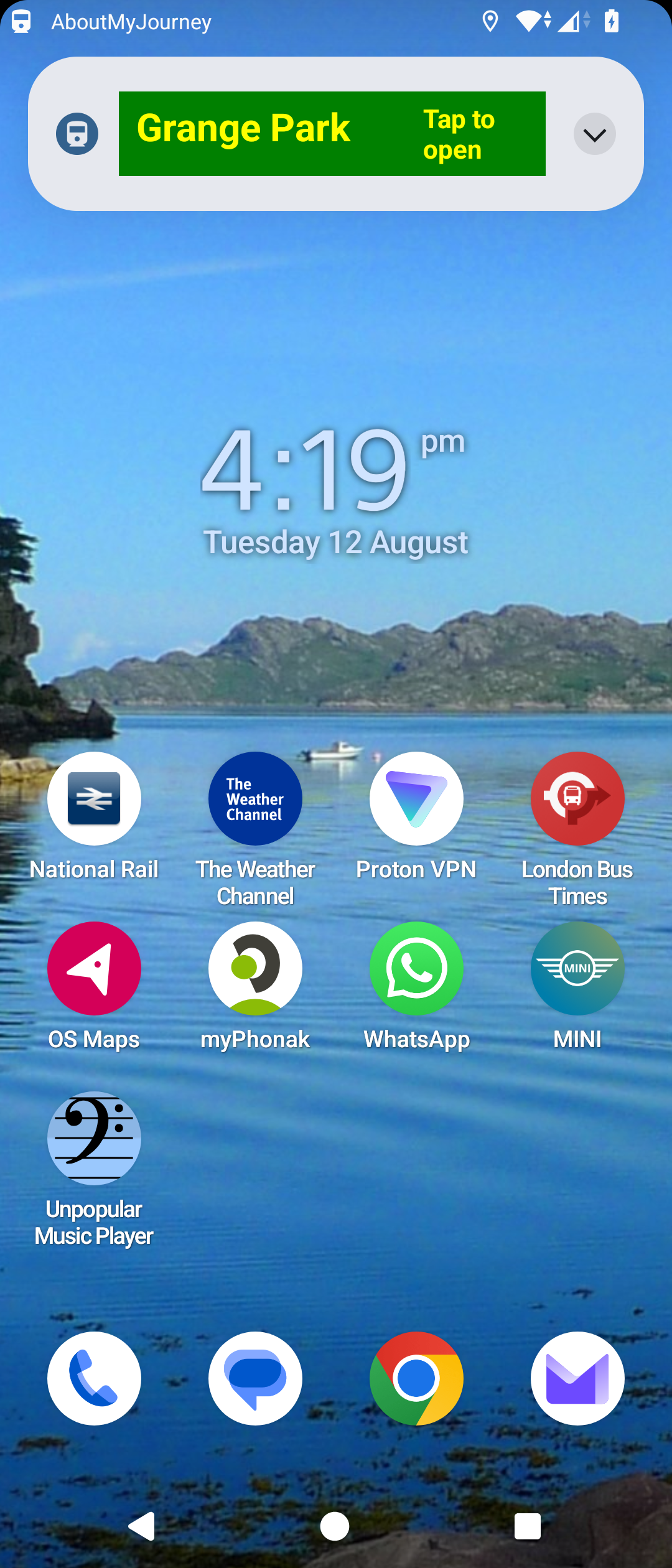
The app uses a full screen notification for this purpose, because the notification needs to remain on the screen for long enough to ensure that the user will not miss it if they are doing something else at that moment. The alternative of a heads-up notification is too easily missed, and even if the user does see it, it can be very annoying to have to stop what one is doing (not necessarily on a mobile device) immediately to respond before it disappears (I have tried it!).
The notification does not actually cover the full screen – just an area at the top of it (In the example shown below the notification is the area with the name “Grange Park” at the top of the screenshot of my home screen). It therefore does not cover up what the user is doing, and is easily dismissed. Otherwise, it will disappear automatically after a time (1 to 5 minutes, selectable by the user in the app’s SETTINGS menu).
Displaying a notification when the user is near a place of interest is the core function of the app. This notification must be seen immediately. If it were too easily missed, or were not seen until after the train has passed the place of interest, the app would be pointless! If the user did not want these notifications, he would not be using the app.>/div>
* A notification remains in the notification drawer, with an icon in the status bar